

“Activity” means different things to different people. For a creator, it’s how their own posts perform. For a marketer, it’s what competitors and influencers do every week. For a curious individual, it’s what a friend or favorite public figure has been liking and following lately. No single tool covers all of that equally well.
That’s why choosing an Instagram activity tracker starts with knowing which kind of activity you care about. Below we compare four popular options, explain what each one actually tracks and help you decide which fits your goal.
Two Kinds of Activity Tracking
Before the list, one distinction that saves a lot of confusion:
- Your own account’s performance. Reach, engagement, follower growth, best posting times. These tools usually connect to your account.
- Other public profiles’ behavior. What someone likes, who they follow and unfollow, when they’re active. These tools work from public data and shouldn’t need your login.
Many disappointments come from buying a tool built for one job and expecting it to do the other.
1. Snoopreport: Best for Understanding What a Profile Is Into
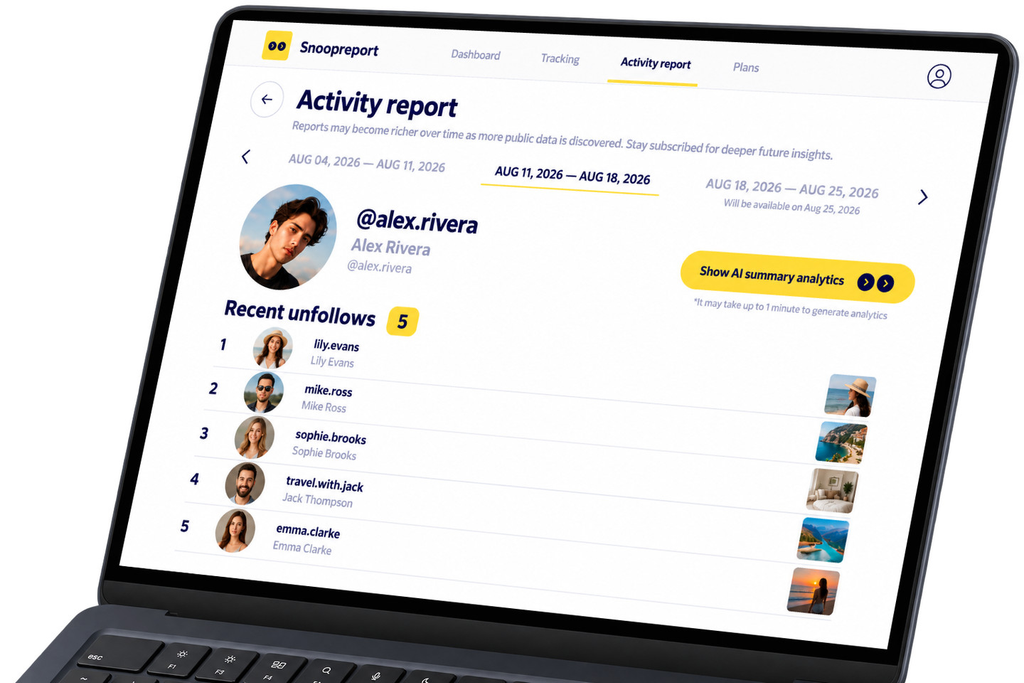
Snoopreport tracks the behavior of any public profile. Since 2017 it has served more than 500,000 users, and its weekly or monthly reports cover liked posts and reels, new follows and unfollows, and the hours when a profile is most active.
Its strongest feature is the AI Summary, which reads across likes and follows and describes a profile’s interests and habits in plain language. You get answers rather than raw lists: what a person is into, which creators a brand engages with, how attention shifts from month to month.
- Tracks likes, follows and unfollows of any public profile
- Weekly and monthly history
- AI Summary with interests, habits and ideas
- Never connects to your Instagram account
- From $0.99 a week
Best for: individuals, marketers and parents who want to understand another public profile’s activity.
2. DolphinRadar: Best for a Broad Toolkit
DolphinRadar also works with public data and doesn’t require connecting your account. It shows liked photos, recent follows and unfollows, top interactions and trending content tags, and adds extras such as an anonymous story viewer, a downloader, a hashtag generator and a database of influencers for marketers.
After you add an account, DolphinRadar runs a detection period before the first report is ready, so plan for a short wait.
Best for: users who want many Instagram utilities in one subscription.
3. InsTrack for Instagram: Best for Your Own Business Account
InsTrack for Instagram is an iOS analytics app aimed at professional accounts. According to its App Store listing, it tracks your account’s key metrics, compares them with similar accounts, monitors competitors and hashtags, analyzes posts, alerts you to follower gains and losses and includes a post scheduler.
There’s an important difference from the tools above: InsTrack requires a professional Instagram account and connects through a Facebook login. That’s normal for a performance analytics tool, but it means the app works with your account rather than observing other profiles from the outside. Pro plans are listed from $4.99 a month.
Best for: creators and small businesses optimizing their own content.
4. Instagram Insights: Best Free Option for Your Own Stats
Instagram’s built-in Insights is free for professional accounts. It shows reach, interactions, follower growth and content performance for your own profile, right inside the app.
It’s an excellent starting point and often all a small creator needs. It won’t, however, show you anything about what other accounts like or follow.
Best for: anyone measuring their own posts at zero cost.
Side-by-Side
| Snoopreport | DolphinRadar | InsTrack | Insights | |
| Tracks other public profiles | Yes | Yes | Competitor metrics | No |
| Likes of tracked profile | Yes | Yes | No | No |
| Follows and unfollows | Yes | Yes | Your own followers | Follower growth |
| AI interpretation | AI Summary | AI-powered analysis | Suggestions | No |
| Needs your account | No | No | Yes, via Facebook login | Built in |
| Price | From $0.99/week | Paid plans | Pro from $4.99/month | Free |
Real-World Scenarios
To make the differences concrete, here’s how each tool handles three common situations.
A boutique owner researching influencers
She wants to know whether three local creators genuinely care about sustainable fashion. Insights and InsTrack can’t help, because these aren’t her accounts. Snoopreport shows which posts the creators like and which brands they follow, and the AI Summary sums up their interests. DolphinRadar can show similar raw data alongside its influencer database.
A creator improving their own content
He wants to know which reels drive follows. Instagram Insights answers that for free, and InsTrack adds competitor benchmarks and posting suggestions. A behavior tracker like Snoopreport is a useful complement for checking what similar creators’ audiences are liking, but it isn’t a replacement for native analytics.
Someone looking for a thoughtful gift
A friend’s birthday is coming up and the usual ideas feel stale. A few weeks of Snoopreport reports on the friend’s public profile show the creators, hobbies and brands they’ve been engaging with, and the AI Summary even suggests gift ideas based on that activity.
Why Activity Data Is Worth Your Time
Instagram isn’t a niche platform. According to Pew Research Center, half of U.S. adults say they use it. That makes activity on Instagram one of the broadest public windows into what people care about, from the brands they follow to the content they quietly like. Tracking it well can inform gift choices, influencer deals, content plans and product ideas.
How to Choose in Two Questions
- Whose activity do you need? Your own account points to Insights or InsTrack. Other public profiles point to Snoopreport or DolphinRadar.
- Do you need lists or answers? If you want to read every like yourself, any tracker will do. If you want a short explanation of what the activity means, Snoopreport’s AI Summary is the deciding factor.
A Safety Checklist Before You Sign Up
Whatever you pick, run through these checks first:
- Does the tool ask for your Instagram password? Tools that observe other profiles have no reason to.
- Does it promise access to private accounts or DMs? That’s a red flag; Instagram doesn’t make that data available.
- Is the price clear before you sign up?
- Is there a sample report so you can see what you’re paying for?
Snoopreport passes all four: no login, public data only, a visible price and a sample report on its website.
Instagram Activity Tracker FAQ
Can one tool track both my account and others?
- Partly. Snoopreport can track any public profile, including your own, but it focuses on behavior such as likes and follows rather than reach and impressions. For deep performance analytics on your own posts, pair it with Instagram Insights.
Will tracked accounts know?
- Not with login-free trackers. They don’t use your account, so nothing appears on the tracked profile.
How long until the data is useful?
- The first report gives you a snapshot. After three or four weekly reports, real patterns start to show, especially in likes and follows.
Conclusion
The best Instagram activity tracker depends on whose activity you need. For your own numbers, Insights and InsTrack are solid. For understanding what other public profiles like and follow, Snoopreport offers the clearest picture: likes, follows, history and an AI Summary in one report, with no login and a starting price of $0.99 a week. Visit snoopreport.com to add your first profile