
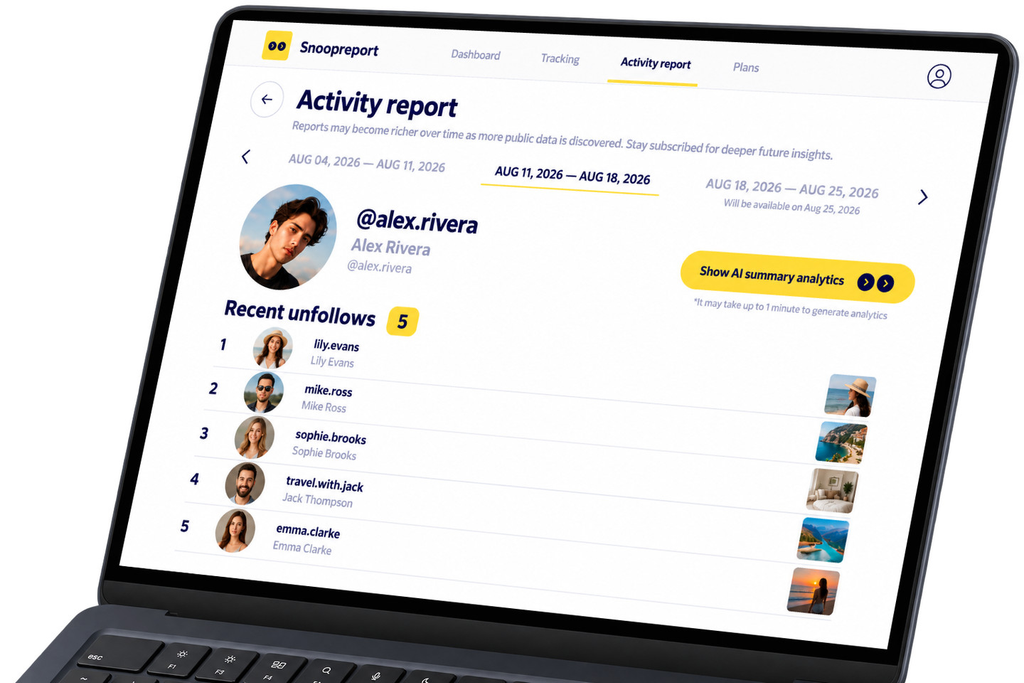
Instagram will tell you when someone follows you. It will never tell you when they leave, and it certainly won’t tell you when an account you care about quietly unfollows someone else. Follower counts drop, following lists shrink, and the story behind the change stays hidden.
An Instagram unfollow tracker fills that gap by recording changes over time. In this review we look at Snoopreport, a long-running tracker that covers unfollows alongside follows and likes, and explain what its reports actually show and who they are for.
Why Unfollows Are Worth Tracking
Unfollows are small events with big meaning. They can point to:
- A shift in interests. Someone drops a set of fitness accounts and starts following cooking creators.
- Changing relationships. A creator stops following a brand they used to promote.
- Content that missed the mark. A wave of unfollows after a specific post on your own account.
- Competitor moves. A brand unfollows an agency or supplier, hinting at a new partner.
None of this is visible in the app. You only see the current list, never what disappeared from it. And since Instagram shows other people’s following lists in a shuffled order, even spotting new follows by eye is close to impossible once an account follows more than a few hundred profiles. A tracker that records the list over time is the only practical way to see what changed.
Snoopreport at a Glance
Snoopreport has tracked Instagram activity since 2017 and is used by more than 500,000 people. You add any public profile, including your own, and the service builds reports weekly or monthly. Unfollows sit next to new follows and liked posts, so you see the full picture rather than one isolated metric.
- Unfollows and new follows with dates
- Liked posts and reels from the same profile
- Active hours and an AI Summary of interests
- No login required; your account is never connected
- Plans from $0.99 a week
Inside a Report
The unfollow list
Each report lists the accounts the profile stopped following during the period. Because reports are stored, you can scroll back and see whether an unfollow was a one-off or part of a pattern, for example several accounts from the same niche dropped within a few weeks.
Context from follows and likes
An unfollow on its own raises a question. The rest of the report often answers it. If a profile unfollows three running clubs and starts liking climbing videos, the story is obvious. Snoopreport puts those signals side by side, so you don’t have to cross-reference several apps.
The AI Summary
On top of the raw lists, the AI Summary describes the profile’s interests and habits in plain language. When the summary changes from one month to the next, you get a quick read on how someone’s attention is shifting.
How to Read Unfollow Patterns
Raw unfollow lists can be misleading if you read them one line at a time. A few rules of thumb help:
- Group unfollows by type. Five unfollowed fitness accounts is a trend; five random accounts is housekeeping.
- Check what replaced them. New follows in the same report usually explain the unfollows.
- Mind the timing. A cluster of changes in one week often follows a life event, a new job or a new project.
- Don’t over-read single events. People tidy their feeds. One unfollow rarely means anything personal.
For your own account, compare unfollow spikes with your posting history. If people leave after a certain type of post, that’s useful feedback; if the number stays flat while you post more, your content is doing its job.
How It Compares to Other Options
Instagram Insights is free for professional accounts and shows your follower growth, but it doesn’t name who unfollowed you and covers only your own profile.
Mobile unfollower apps typically focus on your own account and often require you to log in with your Instagram credentials, which brings the security risks described below.
Manual tracking with screenshots and spreadsheets is free but slow, and it breaks down quickly because Instagram doesn’t sort other people’s following lists by date.
Snoopreport sits in a different spot: it tracks any public profile, adds likes and an AI Summary, and doesn’t need your login.
Who It’s For
- Creators who want to understand who leaves and why, and compare that against their posting history.
- Marketers watching how influencers’ and competitors’ connections change.
- Curious individuals who want to understand the interests of friends, favorite creators or public figures.
- Parents keeping an eye on a teen’s public account activity.
Getting Started in Three Steps
- Add the profile. Enter the public username on snoopreport.com. You don’t follow the account and you don’t log in with Instagram.
- Let history build. The first report shows the current period; each new report adds to the timeline, so patterns become clearer every week.
- Review and compare. Read the AI Summary for the big picture, then check the unfollow and follow lists for specifics. Compare against previous reports to see what changed.
If you’re unsure what a report looks like, the sample report on the website shows the exact format, including the unfollow list, liked posts and the AI Summary. It’s worth a look before you decide which profiles to add first.
Keep Your Account Safe While Tracking
Most “who unfollowed me” apps work by logging into your account. Instagram’s own security guidance warns against giving your login details to apps you don’t trust, because they can gain complete access to your account. Beyond the risk of a takeover, automated activity from third-party apps can lead to restrictions on your profile.
Snoopreport sidesteps the problem entirely. It never asks for your password, it doesn’t connect to your account, and it builds reports only from public activity.
Pros and Cons
What we like:
- Unfollows, follows and likes in one place, with history
- Works for any public profile, not just your own
- AI Summary turns lists into insight
- Low weekly price and no login
What to keep in mind:
- Reports are weekly or monthly rather than instant alerts
- Like every legitimate tracker, it can’t see private accounts
Instagram Unfollow Tracker FAQ
Does Snoopreport tell the person I’m tracking them?
- No. Because your account is never used, nothing about your tracking appears on the profile you follow.
Can I track my own unfollowers?
- Yes. Add your own public profile, and the reports will show your follow and unfollow history next to the profiles you watch.
Why weekly reports instead of real-time alerts?
- Weekly reports show patterns rather than noise. A single unfollow means little; a series of related changes over several weeks tells you something real.
Can it see unfollows on private accounts?
- No. Private following lists are visible only to approved followers, and no legitimate Instagram unfollow tracker can get around that. Snoopreport works with public profiles only.
Verdict
If you want an Instagram unfollow tracker that explains changes rather than just listing them, Snoopreport is easy to recommend. It combines unfollows with follows, likes and an AI Summary, keeps your account out of the process and starts at $0.99 a week. Add a profile at snoopreport.com and your first report will show you what’s been changing behind the follower count.